
Ticket Helpdesk vs. Freshdesk
Your team needs a helpdesk.
Not another platform to manage.
Looking for a simpler Freshdesk alternative? If your team already works in Microsoft Teams, Ticket Helpdesk gives your support emails a home, every request an owner, and your budget room to breathe.
Start with a 14-day trial for one support agent, then Free with up to 100 tickets per UTC calendar month. More tickets require a paid plan, even for one agent.
Ticket Helpdesk PRO · 5 agents
$56.25/ month equivalent$675 billed annually. Every agent is paid.
Freshdesk Growth · 5 agents
$95/ month equivalent$1,140 billed annually. $19 per agent/month.
USD list-price example, before tax and optional extras. Different feature sets; annual billing on both sides. Ticket Helpdesk prices use our website’s base rates; localized checkout prices may vary. Sources and assumptions.
Simplicity is a feature
Solve the inbox problem. Skip the platform project.
A shared support mailbox is easy to start and hard to coordinate. Who is handling that request? Has anyone replied? Which tickets need attention today?
Ticket Helpdesk is built around those everyday questions. Connect your Microsoft 365 support mailbox, turn incoming emails into tickets, and manage the work in shared queues. Assign an owner, keep the conversation together, and follow the request through to resolution.
A central Inbox, not another mailbox to check
The central Inbox puts folders, a searchable ticket list and the selected conversation side by side. Move between Unassigned, Mine, Needs reply and Waiting, filter by queue, and reply without leaving the list. Explore the Inbox workspace.
Collect the right information on the first request
Custom fields let you add text, dropdown, number, date and yes/no questions per queue. Make them requester-visible or internal, and require key answers on requester forms without blocking email intake. Shared forms also support file uploads for screenshots, documents and logs. See custom fields and form upload limits.
One place for the work
Emails, replies, attachments, internal notes, and ticket history stay together instead of getting lost across inboxes.
Clear ownership
Queues, assignments, priorities, reminders, and SLA targets help your team see what needs doing next.
Workspace administrators can enable a timezone and Monday–Friday working hours in Settings → General → SLA business hours. First-response and resolution SLAs then skip nights and weekends and adjust for daylight saving. A resolution business day equals one configured workday. Without this opt-in setting, first response uses elapsed hours and resolution skips weekends only. Holidays and multiple calendars are not included, and existing deadlines stay unchanged. Read the business-hours SLA details.
A focused subscription
PRO includes unlimited tickets and queues, multiple mailboxes, time tracking, reporting, and 12-month audit history.
Freshdesk offers a broader customer-service toolkit. That breadth can be valuable. But if you need a practical shared support inbox, you do not have to make a full customer-service platform your next project.
Make Teams your ticket workspace, not just a notification channel.
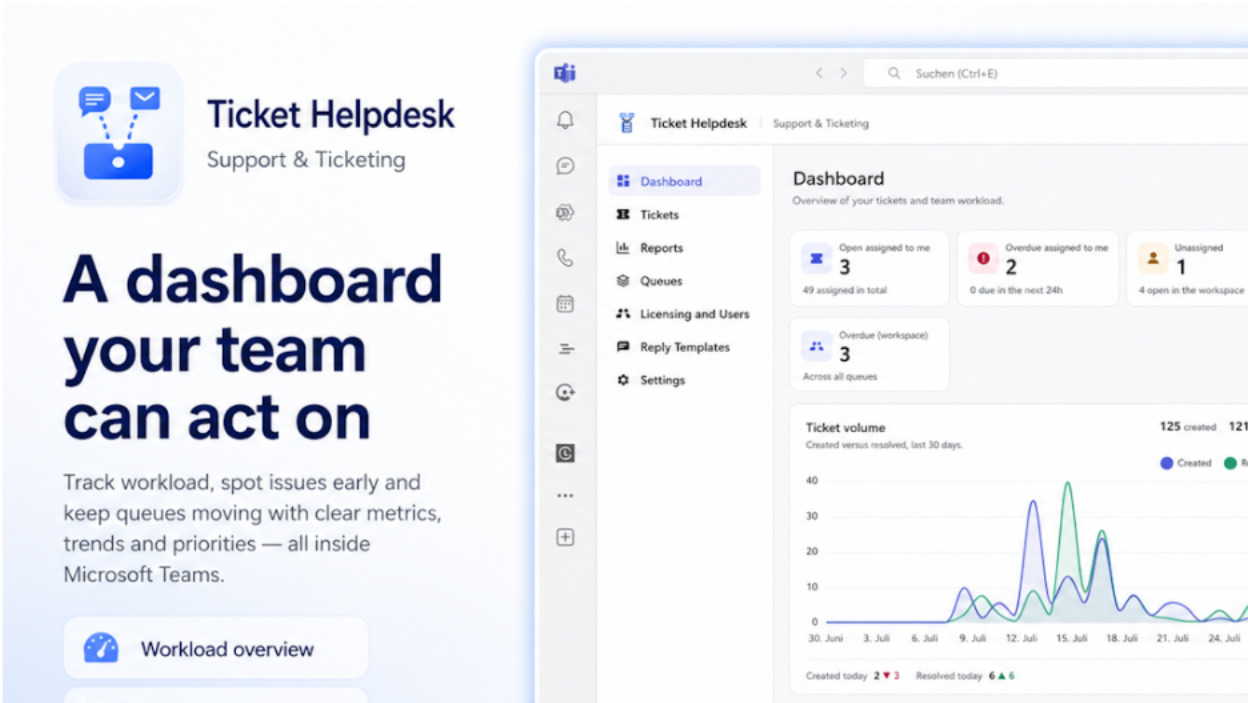
Your team already talks in Teams. Ticket Helpdesk puts the ticket list, conversations, queues, and reports there too. You can triage requests, reply to customers, add internal notes, and track progress in a dedicated Teams tab. Prefer a browser? The app works there as well.
You can also install the standalone PWA and open the same workspace from your home screen, taskbar or dock in its own window. Teams is a choice, not a requirement for doing the work. An internet connection is required; this is not offline ticket access. See how to install the app.
Freshdesk also works with Teams. Its integration supports creating, viewing, and updating tickets, public replies, private notes, and notifications. The distinction is our focus: a complete, purpose-built ticket workspace in Teams, rather than adding a Teams integration to a broader helpdesk platform. See Freshdesk’s own integration guide.
Requesters do not have to work in Teams. They can email your connected mailbox or use a shared request form. The customer ticket status page shows public replies, progress, requester-visible custom fields and whose turn it is. Customers can reply or reopen a resolved or closed ticket with an explanation, without a helpdesk account. Treat private links like passwords: anyone with the link can access and reply to that ticket. See customer follow-up.
Catch up faster. Reply with a useful starting point.
AI summaries condense the public conversation for handovers. AI reply drafts use the request, approved templates and relevant solved tickets to suggest an editable answer. AI reply-needed detection highlights Needs reply, Review needed or No reply needed, helping the team separate questions from simple acknowledgements.
AI drafts and summaries are included in every plan, with no separate AI package or lifetime draft limit. Free reply generation pauses at 100 tickets per UTC calendar month. Agents review drafts before sending and can correct reply-needed labels; detection does not change ticket status or close tickets. Automatic summaries have a per-queue opt-out, while automatic drafts require opt-in. Explore the included AI assistance.
Automate routine ticket work, without a bigger platform.
Custom automation is available in Ticket Helpdesk too. Workspace administrators can build WHEN → IF → THEN rules under Settings → Automations: assign new tickets, update status or priority, add internal notes, send template emails, or notify agents. Rules can respond to ticket events, unanswered replies, inactivity, ticket age and approaching or breached SLA deadlines. Preview a rule safely against a ticket and review its execution history.
Trial, PRO and Business include 10 active custom rules per workspace; Enterprise limits are configurable. Free supports disabled drafts and preview, not active custom rules. Channel entitlements still apply, and existing queue automations remain independent. See how our ticket automation works. This is ticket-focused automation, not a claim of equivalent integration breadth or intelligent routing.
Small-team economics
Five agents. $465 less per year.
Ticket Helpdesk PRO charges for every support agent and costs $15 per agent/month on monthly billing, or $135 per agent/year on annual billing. Requesters are not charged.
Freshdesk Growth lists $19 per agent/month, billed annually. Here is how the annual subscription totals compare, charging for every agent on both sides:
| Total support agents | Ticket Helpdesk PRO | Freshdesk Growth | Annual saving |
|---|---|---|---|
| 2 agents | $270/year | $456/year | $186/year |
| 5 agents | $675/year | $1,140/year | $465/year |
| 10 agents | $1,350/year | $2,280/year | $930/year |
41% lower annual subscription cost for a five-agent team. That is $675 instead of $1,140 per year, leaving $465 for the rest of your support budget.
PRO requires a paid license for every agent, starting with one paid seat: the minimum is $15/month or $135/year billed annually. One agent is free only within the Free plan limits, including up to 100 tickets per UTC calendar month. More tickets require a paid plan, even for one agent.
These are base subscription prices, not a claim of identical features or total operating costs. Freshdesk Growth includes a customer portal and knowledge base; Ticket Helpdesk focuses on ticket handling, shared request forms, and private ticket-status links. Taxes, currency localization, discounts, optional add-ons, and Microsoft 365 licensing are excluded. Ticket Helpdesk’s five-agent monthly-billed price is $75/month; the lower example above requires annual billing. Check our current pricing and Freshdesk’s current pricing before purchasing.
Buy the helpdesk you need, not the biggest feature list.
For a small IT, HR, facilities, or customer-support team, the best helpdesk is often the one that keeps requests moving without becoming another system to administer.
Choose Ticket Helpdesk when…
- You want to work in Teams, a browser or the installed standalone app.
- Email and request forms cover your main intake needs.
- You want a central Inbox, custom fields, included AI assistance and clear ownership.
- You would rather keep your setup focused and your agent costs down.
Freshdesk may fit better when…
You need a full customer portal and public knowledge base or a broad app ecosystem. Higher Freshdesk tiers add custom dashboards, intelligent routing, and multiple SLA policies. Ticket Helpdesk now has configurable event- and time-based ticket rules too; needing automation alone is not a reason to choose a broader platform. For broader omnichannel needs, Freshdesk Omni is a separate offering and is not the product priced in this comparison.
We are not trying to replace every feature in Freshdesk. We are giving Teams-based support teams a simpler way to stay organized — at a price that makes sense for a small team.
Less helpdesk overhead. More helping people.
Bring your next support request into Ticket Helpdesk and see how a focused Teams workspace feels.
A 14-day trial for one agent, then Free with one agent, one queue, one mailbox and up to 100 tickets per UTC calendar month, with 30-day audit history. More tickets require a paid plan, even for one agent. The allowance resets on the 1st at 00:00 UTC; at 100 tickets, creation, editing and replies pause until reset or a paid upgrade. Free replies carry our branding, and Free tickets and comments are permanently deleted six calendar months after ticket creation. Automated email intake and notifications require an active trial or paid plan. See all plan limits.